Change Language :
The igus Robot Control software: robot software for free download
Program, simulate and control robots free of charge and under licence
The igus Robot Control allows robots to be programmed, simulated, and controlled easily and intuitively. The modular design supports various robot kinematics, including delta robots, linear robots and multi-axis articulated robots. Individual movement sequences can be simulated on a 3D surface without a connected robot. The software is available for download free of charge and without a licence.
What you will find on this page
Free robot software
The igus Robot Control offers a variety of functions for programming robots
- Simple connection between robot and control system
- Intuitive operation with a 3D surface and digital twin enables direct execution and checking of the movement sequences
- Camera interface configuration directly via control system and software possible
- Programming of delta, linear, SCARA and articulated arm robots
- Software enables risk-free testing even before purchase
System requirements:
- PC with Windows 10 operating system
- Communication via Ethernet or WLAN
- 500MB free disk space
Sample programs, wiki and training courses
Interfaces
PLC interfaces
The PLC interface enables the execution of basic functions and the signalling of states by means of digital inputs and outputs. In addition to the control by a PLC, this interface also allows operation by hardware buttons.
Digital inputs and outputs
Robot programs can be loaded and started and gripper commands can be sent via digital inputs or global signals. This is useful, for example, if a product range is to be selected from a given selection using buttons or the CRI-GSig instruction.
Modbus TCP/IP
The Modbus TCP interface can be used, for example, to send PLC data and instructions to the robot control system and receive status information.
CRI interface
The CRI interface enables complex instructions to be sent and information and settings to be retrieved via the Ethernet interface via TCP/IP. The igus Robot Control uses this interface to connect to robots with integrated control systems or other instances of the control system.
Camera interface
The camera interface allows the use of object detection and video cameras. Object detection cameras recognise the position and class of objects and transmit them, optionally with a video image, to the control system. The control system calculates positions in the robot coordinate system from the object positions of the camera. Pure video cameras only deliver images and can therefore only be used to observe the work area, but not for object detection.
Cloud
The Cloud interface enables the robot to be monitored via RobotDimension. After activation and login, the robot sends basic status information and camera images to the online service. On the website, the user can list his robots and call up the information.
ROS, Matlab, LabView, and many more.
Integrate the robots into your ROS environment. Documentation and packages for hardware communication, Teleop and moveI
Project configurations
Gripper
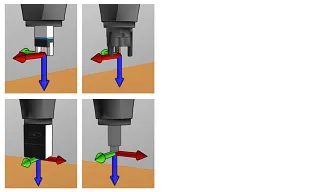
The installed tool can be specified here. Changing the tool requires reloading the project or restarting the integrated control system. New tools can be defined as a configuration file in the "Data/Tools" directory
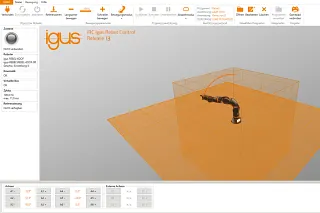
Virtual box
The virtual box settings limit the range of movement of the robot arm. This functionality helps to avoid mechanical damage and simplifies programming according to the application. If a program is executed that violates the virtual box, it is stopped with an error message.
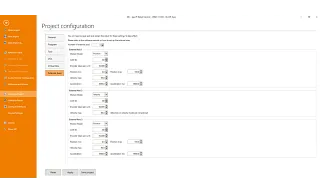
External axes
The robot control system supports up to three additional axes (also called "external axes" in iRC). These can be installed according to the robot axes and configured via the configuration area of iRC.
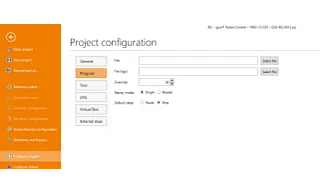
Programs
Here you can set the robot and logic program, the movement speed (as a percentage of the maximum speed), the playback mode and the reaction to program errors.
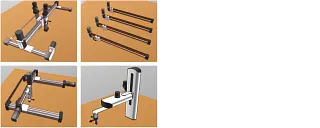
Special kinematics
The robot control system can be individually configured for your robot with a digital twin. We configure the inverse kinematics to suit your project business.
Programming
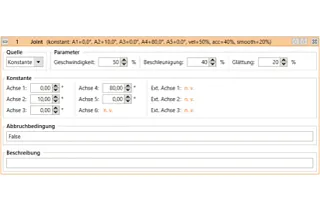
Axis movements
The Joint command moves the robot to an absolute target position specified in axis coordinates (e.g. axis angle or position of a linear axis). The resulting movement of the TCP is usually a curve and not a straight line.
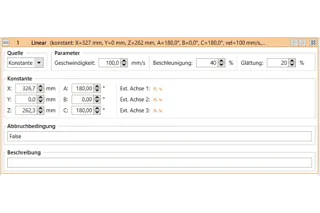
Linear movement
The Linear command moves the robot to an (absolute) target position specified in Cartesian coordinates. The resulting movement of the TCP follows a straight line.
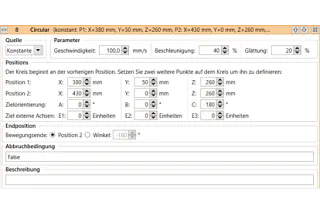
Circular movements
The Circular Movement instruction enables movements along a full or partial circle. It is compatible with linear movements, so that the transition from and to linear movements can be smoothed over.
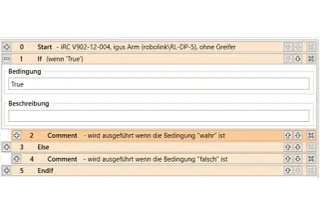
Conditions
Conditions can be used in if-then-else commands, loops and as termination conditions in movement commands. The conditions can be combinations of digital inputs, global signals, Boolean operations and comparisons.
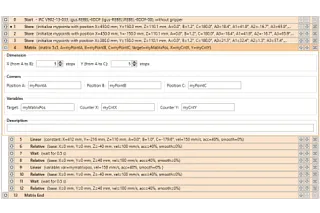
Matrix calculation
The grid instructions calculate positions that are aligned with a grid, e.g. as gripping or depositing positions for palletising tasks.
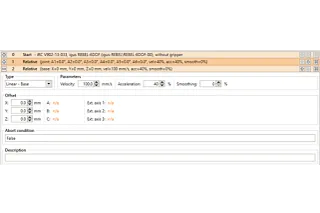
Relative
The Relative command allows moving the robot relative to its current position. It can be called up via the menu items under "Action" → "Relative movement".
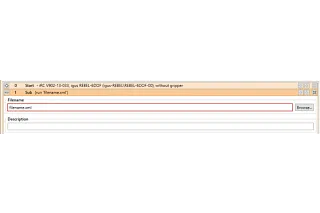
Subprograms
Subprograms can be called up with the Sub command. The path to the subprogram file is specified under "File name". It is relative to the "Programs" subfolder of the iRC "Data" folder.
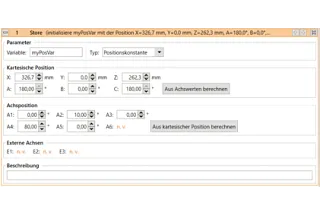
Variables and variable access
Two types of variables are supported in programs for the igus Robot Control and TinyCtrl:
- Numerical variables: These can be used to store integer or floating point numbers.
- Position variables: These can be used to store Cartesian positions and joint positions. Whether such a variable is interpreted as a Cartesian position or a joint position depends on the context.
Programming robots with Python and C++
The igus Robot Control software enables intuitive programming, simulation, and control of various robot kinematics. For custom automation applications, the robot control system can also be connected to external programs via open interfaces. Python and C++ in particular offer developers flexible ways to create their own functions and integrate robots into existing software and automation environments.
An API and example code for Python and C++ are available via the app interface. This allows individual applications to process status information from the robot control system, change program variables, or provide their own functions. Since the interface is based on gRPC, it is also possible to connect other programming languages with appropriate development effort.
The CRI Ethernet interface can also be used for external robot control system. The TCP-based protocol allows robot movements to be executed, digital outputs to be switched, variables to be changed, and robot programs to be loaded, started and stopped. A Python library supports the development of appropriate applications. New sequences can first be tested with the simulation of the igus Robot Control and then transferred to a real robot.
The igus Robot Control combines beginner-friendly robot programming with the advanced options of Python, C++, and open programming interfaces. This creates a flexible foundation for individual robotic solutions, the integration of external systems, and the automation of complex processes.
Download robot software
The licence-free igus Robot Control software is integrated into the control system and thus makes use of a uniform operating concept and consistent communication services for many components of a system. This reduces project planning effort and facilitates commissioning.
- Test all igus kinematics in the software in advance
- With pre-programmed projects for all igus robots, single axes and AGV
- Intuitive 3D interface with simulation of the robot
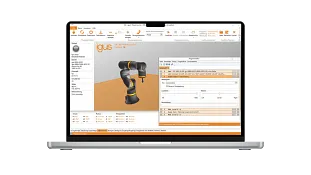
What is robot software?
Robot software is an application used to program, simulate and control physical robots. Users define motion sequences, move to positions, create programs and configure the communication between the robot, the control system, and connected components. In English-speaking countries, the terms "robot control software" or "robotics software" are often used for this.
It is important to distinguish this from the software robot: this usually refers to an RPA bot that automates recurring digital business processes, for example in SAP, ERP or Office systems. The igus Robot Control has nothing to do with this. It is software for real robot hardware and automation applications.
What makes the igus Robot Control different?
Many solutions on the market are either time-limited trial versions that require payment once the trial period expires, or proprietary software that only works with robots from a single manufacturer. The igus Robot Control is permanently free of charge and licence-free, supports several robot kinematics, and can be integrated into existing automation environments via open interfaces such as ROS, Matlab and LabVIEW. In addition, there are free example programs, comprehensive wiki documentation, and training courses for beginners as well as advanced users.
Program and simulate robots for free, without any hardware
Motion sequences can be planned and tested via the integrated 3D interface before a robot is connected. A digital twin creates a virtual representation of the selected kinematics. This offline programming detects errors at an early stage and saves time during commissioning, because the finished program can be transferred directly to the real hardware.
Functions of the igus Robot Control software
• Programming of delta, linear, SCARA and articulated arm robots
• Intuitive 3D interface with digital twin for robot simulation
• Linear, circular and axis-related motion commands
• Conditions, loops and subroutines for complex sequences
• Virtual range of motion limits and position variables
• Configuration of grippers and up to three external axes
• Camera and PLC interfaces for object recognition and automation
• Communication via digital inputs/outputs, Modbus TCP/IP and CRI
• Connection to ROS, Matlab and LabVIEW
System requirements
To get started, all you need is a Windows 10 computer with about 500MB of free storage space and an Ethernet or WLAN connection to communicate with the robot.
Project configuration and programming commands
For every project, grippers, virtual motion range limits, up to three external axis and individual error handling and playback modes can be configured. For special kinematics, the inverse kinematics can also be adjusted.
For programming, axis movements in joint coordinates, linear and circular movements in Cartesian coordinates, conditions, loops and subroutines as well as matrix calculations for palletising tasks are available. Relative movements from the current position as well as numerical and position variables round off the range of functions.
Interfaces for robot control system and automation
The software offers several interfaces for the robot control system during operation: PLC connection via digital inputs and outputs or Modbus TCP/IP, the CRI interface for complex commands via Ethernet and the camera interface for object recognition. In addition, the robot can be monitored remotely via the RobotDimension cloud. This allows the software to fit directly into existing control and automation environments instead of running in isolation.
Example programs, wiki and training
Pre-programmed example projects for igus robots, individual axes, and automated guided vehicle systems make it easy to get started. Detailed wiki documentation covers technical questions and training courses for beginners to advanced users provide practical programming knowledge, either individually or in groups.
Download robot software for free
The igus Robot Control software is available for download free of charge and without a licence, with no hidden costs after a trial phase. No connected robot is required for the first steps: select kinematics, create a project and test motion sequences directly in the 3D simulation.
Consulting
I look forward to answering your questions
J. & E. Papadopoulos S.A.+30 210 4113133Write e-mail
Shipping and consultation
In person:
Monday to Friday from 7 am - 17 pm.
Saturdays from 8 am- 12 pm.
Online:
24h
WhatsApp-Service:
Montag – Freitag: 8 – 16 Uhr